Sundar Pichai (CEO Google) has made some groundbreaking announcements this afternoon in the first day of the Google I/O annual developer conference 2018, curently being held from 8th to 9th.
Some of them like Captions, Duplex, Lens or News are powered by the latest AI developments by Google. Some others, like the improved interaction with the Google Assistant are both based in AI and natural language advances.
The objective is helping users saving time and enhancing their digital well being.
In this latest field, digital well being, Pichai has unveiled new developments aimed to help people turn off their mobile phones without feeling that tey are missing someting they shouldn’t while disconnected.
I summarize in this post some of the developments announced today that as well as enhancing the users digital experience may open opportunities for companies working in the communications, marketing and advertising industries.
AI applied to TV.- Looking to Listen for hearing impaired people
Leaving aside the deep transformation that AI in bringing to healthcare, Sundar Pichai told about Looking to Listen.
“Another area where AI can solve important problems is accessibility. Take the example of captions. When you turn on the TV it’s not uncommon to see people talking over one another. This makes a conversation hard to follow, especially if you’re hearing-impaired. But using audio and visual cues together, our researchers were able to isolate voices and caption each speaker separately. We call this technology Looking to Listen and are excited about its potential to improve captions for everyone”, Google’s CEO explained.
Google Assistant will talk with you, give tailored tips and let keeping your hands on the car wheel
Thanks to Google’s progress in language understanding, users will soon be able to have a natural back-and-forth conversation with the Google Assistant without repeating “Hey Google” for each follow-up request.
“We’re also adding a half a dozen new voices to personalize your Google Assistant, plus one very recognizable one,John Legend (!). So, next time you ask Google to tell you the forecast or play “All of Me,” don’t be surprised if John Legend himself is around to help,” Pichai said.
Google Assistant also turns more visually assistive with new experiences for Smart Displays and phones.
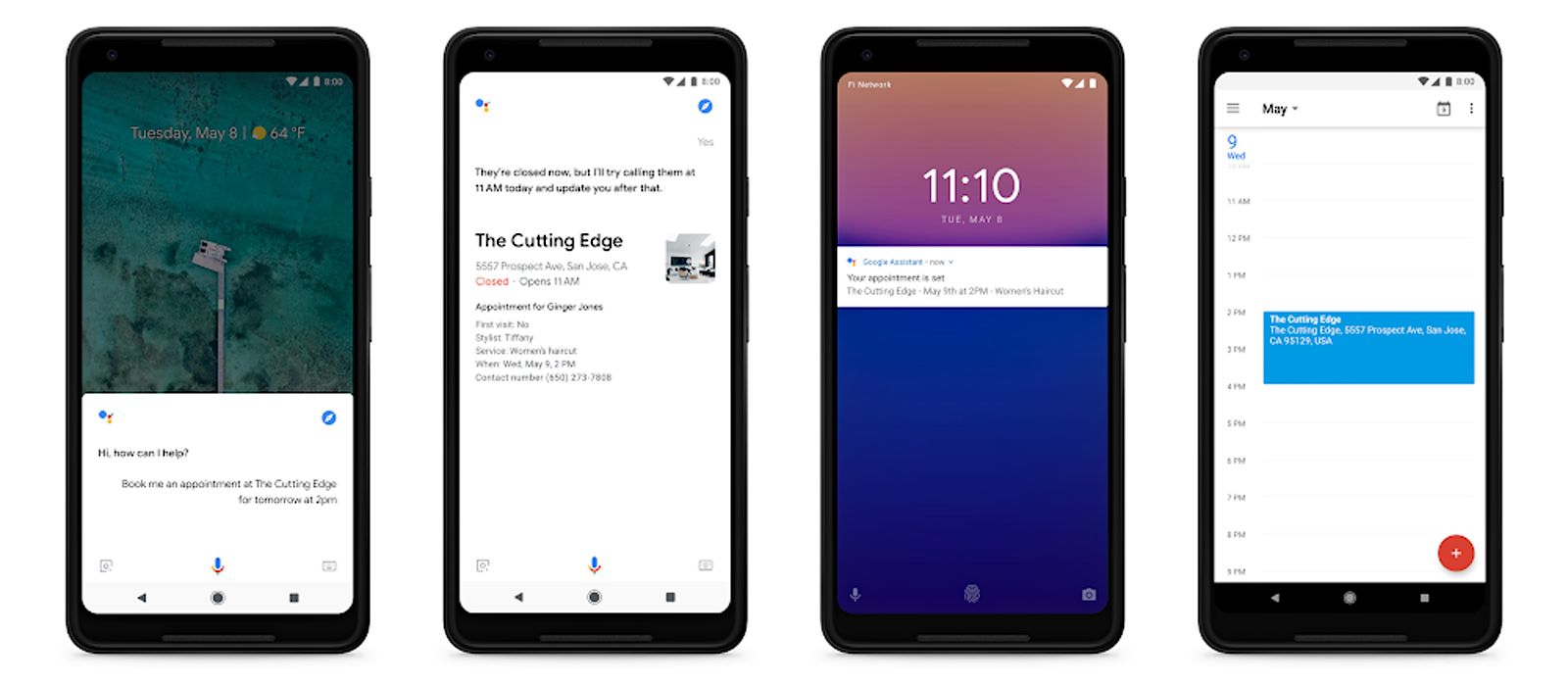
On mobile, the Assistant will give each user a quick snapshot of his/her day with suggestions based on location, time of day, and recent interactions.
“And we’re bringing the Google Assistant to navigation in Google Maps, so you can get information while keeping your hands on the wheel and your eyes on the road,” advanced Pichai.
Duplex for Google Assistant.- Soon the assistant will be able to book a restaurant for you
“Soon, your Google Assistant might be able to help with tasks that still require a phone call, like booking a haircut or verifying a store’s holiday hours. We call this new technology Google Duplex. It’s still early, and we need to get the experience right, but done correctly we believe this will save time for people and generate value for small businesses,” advanced Sundar Pichai
AI applied to Maps
In the coming months, Google Maps will become more assistive and personal with new features that help you figure out what to eat, drink, and do–no matter what part of the world you’re in. The new AI features that will make all these possible are: a redesigned Explore tab;your Match; For you tab; and group planning.
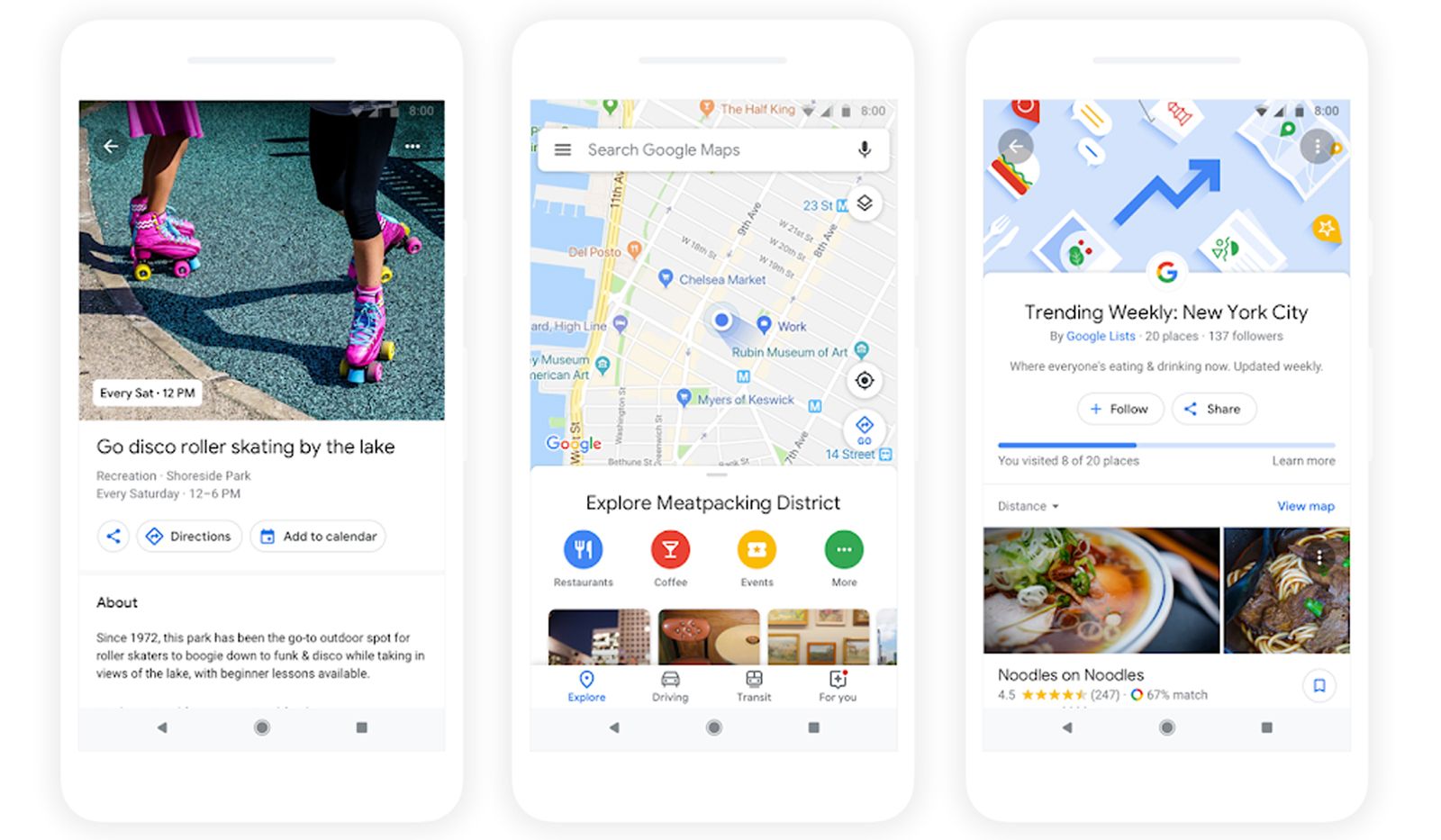
The Explore tab becomes the user’s hub for everything new and interesting nearby. When he/she checks out a particular area on the map, the user sees dining, event, and activity options based on the area he/she’s looking at. Top trending lists like the Foodie List show the user where the tastemakers are going, and help finding new restaurants based on information from local experts, Google’s algorithms, and trusted publishers.
Tapping on any food or drink venue will display your “match”, a number that suggests how likely the user is to enjoy a place and reasons explaining why. Google apllies machine learning to generate this number, based on a few factors: what they know about a business, the food and drink preferences the user selected in Google Maps, places he/she has been to, and whether the user rated a restaurant or added it to a list. Your matches change as the user’s own tastes and preferences evolve over time
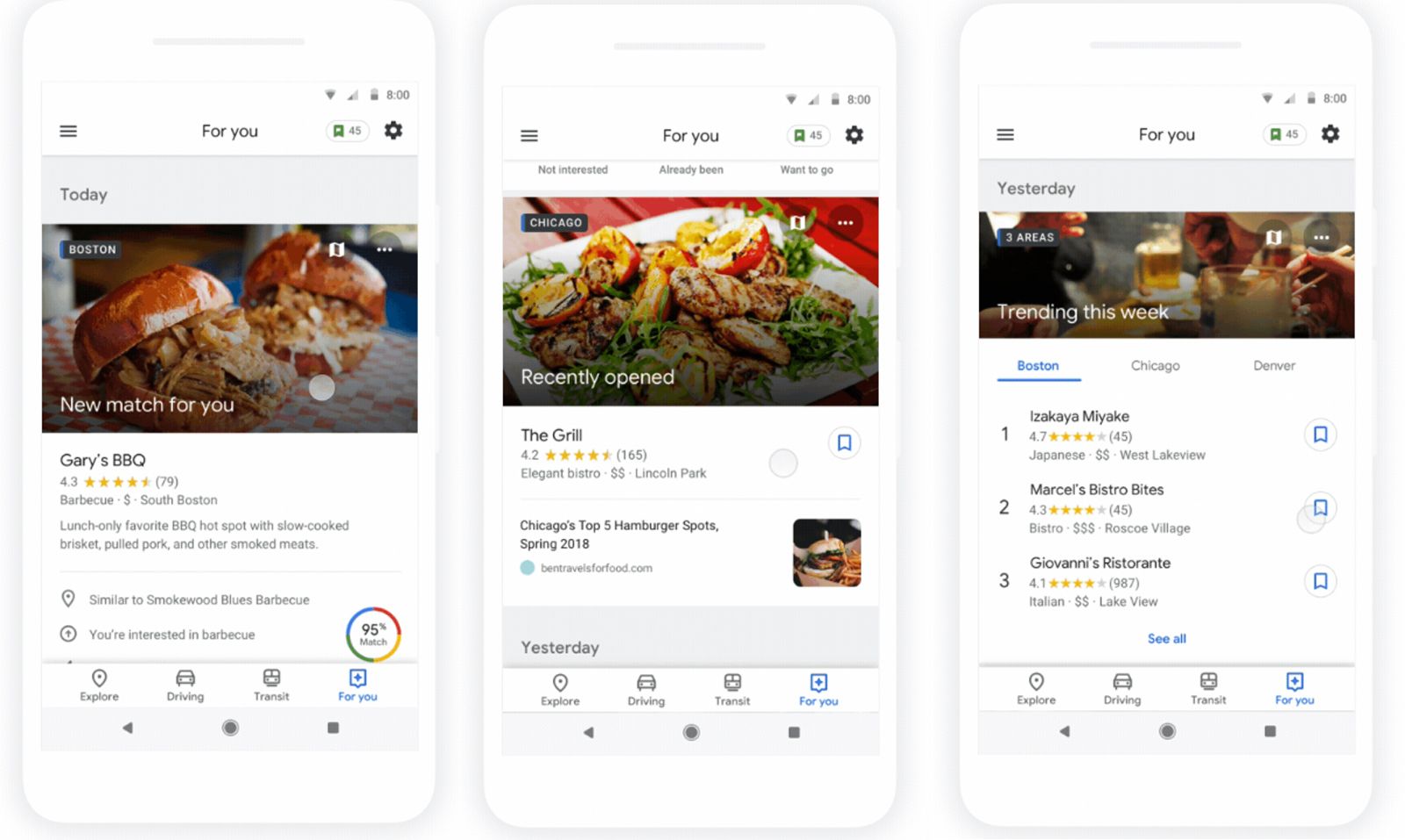
The new “For you” tab is the best way to stay on top of the latest and greatest things happening in the areas the user is into. Users can choose to follow neighborhoods and dining spots they want to try so they’ll always have an idea for their next outing.

Group planning will soon be possible. Just long press on the places you’re interested in to add one location to a shareable shortlist that your friends and family can add more places to and vote on. Once you’ve made a decision together, you can use Google Maps to book a reservation and find a ride.
AI applied to Google Lens
“AI’s progress in understanding the physical world has dramatically improved Google Maps and created new applications like Google Lens. Maps can now tell you if the business you’re looking for is open, how busy it is, and whether parking is easy to find before you arrive. Lens lets you just point your camera and get answers about everything from that building in front of you … to the concert poster you passed … to that lamp you liked in the store window,” explained Google’s CEO.
Last year, Google introduced Lens in Google Photos and the Assistant. People are already using it to answer all kind of questions—especially when they’re difficult to describe in a search box, like “what type of dog is that?” or “How’s that building called?”
Today at Google I/O, Google announced that Lens will now be available directly in the camera app on supported devices from LGE, Motorola, Xiaomi, Sony Mobile, HMD/Nokia, Transsion, TCL, OnePlus, BQ, Asus, and of course the Google Pixel.

They also announced three new features availabel in the new Lens: smart text selection; style match and real time work.
With smart text selection users can copy and paste text from the real world—like recipes, gift card codes, or Wi-Fi passwords—to their phones.
Lens helps users make sense of a page of words by showing you relevant information and photos. If they say they are at a restaurant and see the name of a dish they don’t recognize Lens will show a picture to give the user a better idea. This requires not just recognizing shapes of letters, but also the meaning and context behind the words.
With style, if an outfit or home decor item catch the user’s eye, he/she can open Lens and not only get info on that specific item (like reviews) but also see things in a similar style that fit the look the user like.
Lens now works in real time. It’s able to proactively surface information instantly and anchor it to the things the users watch. This means that now users can browse the real world just pointing their smartphone camera. Google Lens features will start rolling out over the next few weeks
AI applied to Google News
“Today, we’re launching the new Google News. It uses artificial intelligence to bring forward the best of human intelligence—great reporting done by journalists around the globe—and will help you stay on top of what’s important to you,” announced Sundar Pichai.
The reimagined Google News uses a new set of AI techniques to take a constant flow of information as it hits the web, analyze it in real time and organize it into storylines. This approach means Google News understands the people, places and things involved in a story as it evolves, and connects how they relate to one another. At its core, this technology lets Google synthesize information and put it together in a way that helps the user make sense of what’s happening, and what the impact or reaction has been.
The “For You” feature makes it easy to stay up to date on everything the user care about all in one place. It starts with a briefing of five stories that Google News has organized for each user -a mix of the most important headlines, local news and the latest developments on the topics the user is interested in. the more he/se use the app, the better the app gets.
The “Full Coverage” feature provides a complete picture of how a chosen story is reported from a range of sources. With just a tap you’ll see top headlines from different sources, videos, local news reports, FAQs, social commentary, and a timeline for stories that have played out over time on the same topic.

Content in Full Coverage is the same for everyone. It’s an unpersonalized view of events from a range of trusted news sources, organized by sections such as: headlines (mixed topics), technology, business, sports, entertainment, among others.
And soon, thanks to the new Subscribe with Google platform (launched as a part of the Google News Initiative), users will get access to their paid content everywhere—on all platforms and devices, on Google News, Google Search, and on publishers’ own websites.
Google News is experimenting with a unique visual format called newscasts. Here, the latest developments in natural language understanding bring together a collection of articles, videos and quotes on a single topic. Newscasts make it easy to dive right into perspectives to learn more about a story—plus, it’s easy to read on the user’s phone.
Google News replaces Google Play Newsstand on mobile and desktop and the Google News & Weather app on mobile. It’s rolling out starting today and will be available to everyone on Android, iOS and the web in 127 countries by next week.
AI applied to Gmail and Photos
By understanding the context of an email, Google can suggest phrases to help you write quickly and efficiently, thanks to the new Smart Compose feature.
AI applied to Gmail is also making it easy to share a photo instantly via smart, inline suggestions.
Besides, Google is also rolling out new features that let users quickly brighten a photo, give it a color pop, or even colorize old black and white pictures.
Google’s bet for digital well being through digital disconnect
Google goes further than enhancing the users digital well being through the development of features that save them time.
“Many of us feel tethered to our phones and worry about what we’ll miss if we’re not connected. We want to help people find the right balance and gain a sense of digital wellbeing. To that end, we’re going to release a series of features to help people understand their usage habits and use simple cues to disconnect when they want to, such as turning a phone over on a table to put it in “shush” mode, or “taking a break” from watching YouTube when a reminder pops up,” Pichai explained.
“We’re also kicking off a longer-term effort to support digital wellbeing, including a user education site which is launching today”, he informed.
Image over the headline.- Sundar Pichai (CEO Google) at Google I/O 2018. Caption from the keynote video. © Google.
Related external links: